


Easy Words - Word Puzzle Games
4.83.29K Reviews
App Specs
- Version
- 2.19.0
- Updated On
- License
- Free
- Downloads
- 1,000,000+
- Developer
- Easybrain
- Categories
- Word
- Platform
- Android, iOS
Screenshots
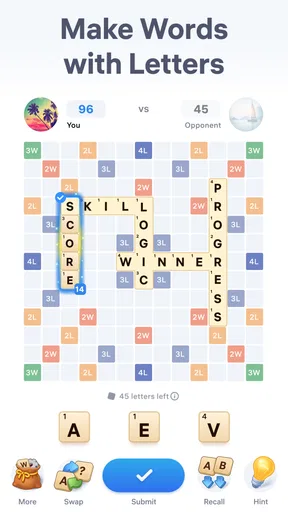
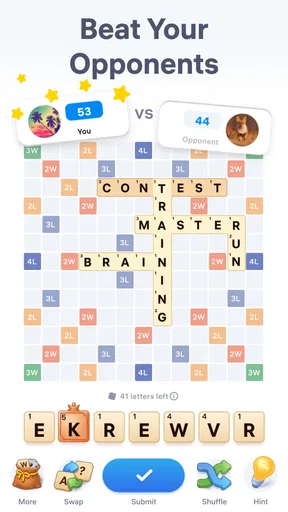
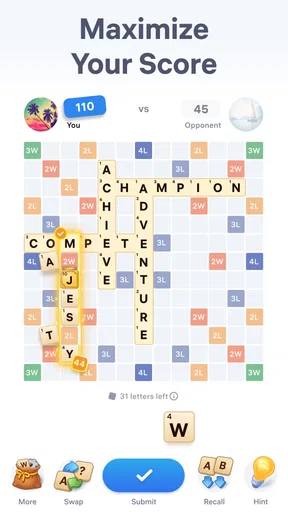
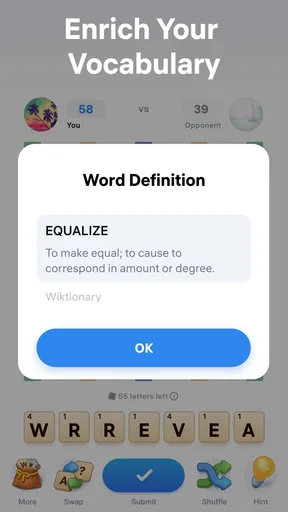

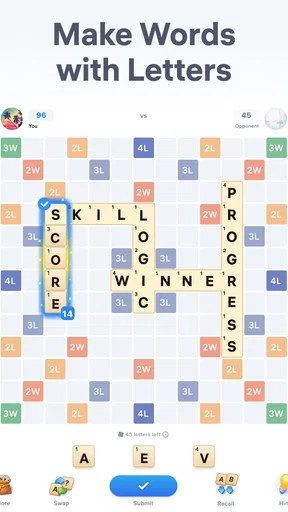
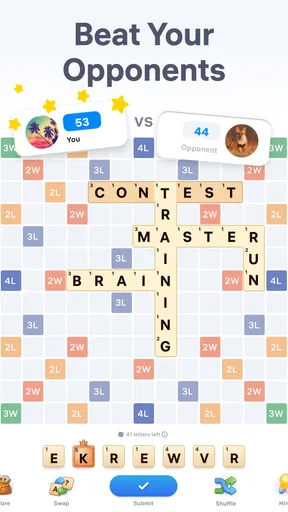
 Analysis by AppCompare
I often reach for a word game when I have a few spare minutes but don’t want to start something that demands a long session. Easy Words - Word Puzzle Games is built around that kind of quick mental break: you work with a set of letters, look for words, and try to outplay an opponent. Its basic appeal is easy to grasp, though the competitive framing means it feels a little different from a purely solo word search. I’d consider it if you enjoy spotting patterns and like having another person’s progress to react to.
Quick rounds suit short breaks
The game’s central task is simple to understand, which makes it easy to pick up while waiting for a bus or taking a short break. The more interesting question is whether you enjoy thinking under a little competitive pressure. Searching for a word at your own pace is relaxing; trying to do it while an opponent is part of the picture can make each choice feel more purposeful. That shift is the main reason I’d choose this over a basic word-search app.
It also makes the game less suitable for every mood. If I want a quiet, unhurried puzzle, a solo crossword or a word-search book is a better fit. Here, the appeal is the combination of vocabulary and a contest, not simply filling spare time with letters. I’d treat it as a focused mini-game rather than something to leave open while doing several other things.
What the contest changes
Forming words from available letters rewards more than a large vocabulary. I find it helps to scan for short, familiar combinations first, then look again for less obvious arrangements instead of fixating on one long word. That small change in approach is useful when a board seems stubborn: mentally grouping letters by likely beginnings or endings can open up options that a quick glance misses.
The opponent element gives that search a clear goal, but it also creates a trade-off. Players who enjoy comparing their decisions may find the rivalry motivating; anyone who dislikes score pressure may prefer a word puzzle without a head-to-head component. I wouldn’t assume that every session will feel equally relaxing. The same letter hunt can be casual one moment and more intense when I’m trying to keep pace.
Who is likely to enjoy it
I see this as a good fit for people who already like word puzzles and want a more interactive alternative to a solo grid. It can also work for someone who wants a compact way to practise spotting letter patterns, provided they enjoy the game’s competitive angle. Easybrain is the developer, and the game sits in the word-puzzle space rather than trying to be a broad collection of unrelated activities.
On the other hand, I’d skip it if my main priority were a fully offline-feeling, solitary puzzle routine, or if I wanted a detailed vocabulary lesson. The core attraction is playing with letters in a contest; it should not be mistaken for a dictionary course or a conventional crossword with long clues. That distinction helps set sensible expectations before installing it.
Worth Reading Before You Choose

Flipboard Shows What News Apps Must Do Beyond the Feed

Switching to Android Auto Means Rethinking Your Driving Routine

Google Calendar Makes a Crowded Week Easier to Manage

Ludo King Makes the Most of the Minutes Between Plans

Baby Panda World Brings Quick Play to Modern Phones, but Its Game Library Feels Busy

ESPN’s Live Game View Makes Following Close Games Easier
Playing in everyday life
A realistic use is a short wait when I have enough attention for a puzzle but not enough time to settle into a longer game. I can focus on the letter combinations, finish a bout, and put the phone away instead of opening a more involved game that encourages a longer commitment. For the best experience, I’d start when I can give the screen a little attention rather than trying to play while walking, working, or listening closely to someone.
Getting Started: The First Impression
Opening the app for the first time, I was greeted with a vibrant and user-friendly interface. The colors are inviting, and the layout is intuitive, making it super easy to navigate. Right off the bat, Easy Words - Word Puzzle Games offers a quick tutorial that’s straightforward and doesn’t feel like a chore. Seriously, it’s like the game is saying, “Hey, let’s have some fun!”
Gameplay That Keeps You Hooked
So, here’s the deal with the gameplay. It’s all about finding words from a jumble of letters, and trust me, it’s as satisfying as it sounds. The levels start off easy, letting you get into the groove without any stress. But don’t be fooled—things get challenging pretty quickly! The difficulty ramps up in a way that keeps you coming back for more, and the feeling of finding that last word is pure joy.
What I love most is how the game keeps things fresh. There are daily challenges, which are a neat way to earn extra rewards while testing your skills. Plus, they’ve got these themed word packs that add a nice twist to the standard gameplay. Whether it’s about food, travel, or even a holiday theme, there’s something for everyone.
Features That Stand Out
Now, let’s talk features. One of the standout features for me is the hint system. If you ever get stuck, you can use hints to nudge you in the right direction. It’s like having a little genie in your pocket, but without any annoying ads popping up every two seconds. Speaking of ads, they’re present, but not intrusive, which is a huge plus in my book.
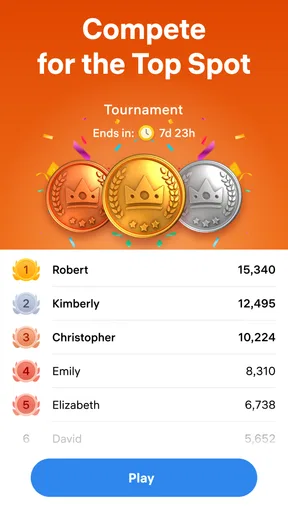
Another cool feature is the leaderboard. If you’re the competitive type, you’ll love seeing how you stack up against other players. It adds a nice touch of rivalry and makes you want to climb up the ranks.
Keeping It Social
One thing that really makes Easy Words stand out is its social aspect. You can connect with friends and challenge them, which adds a fun dynamic to the game. It’s a great way to engage with others while showcasing your word prowess. Plus, sharing your achievements on social media is just a click away.
Speed, stability, and device fit
For a game built around looking at letters and making quick choices, perceived speed matters more than elaborate visual effects. In my experience, the simple puzzle format is well suited to brief sessions, but I wouldn’t read that as a guarantee that every device or connection will behave identically. If a round feels slow, I’d first check whether the phone is busy with other tasks and whether the connection is steady before blaming the puzzle itself.
At heavier-use moments, such as moving from one round to another repeatedly or checking the competitive parts between turns, the practical test is whether the game remains responsive enough not to break concentration. Word puzzles are especially sensitive to small interruptions: a delayed tap can make me lose my place in a set of letters. I’d avoid running several demanding apps at once on an older phone, and I’d close the game normally if I need to switch away for a while rather than assuming an unfinished moment will resume exactly as I left it.
Reliability also includes how easily I can recover when I’m interrupted. If a call or message pulls me away, I’d return to the game and check the current screen before making another move; that is a sensible habit for any mobile game with an opponent, where timing may matter. I wouldn’t use it as a substitute for a notebook or a leisurely puzzle session if I need to preserve a complicated train of thought. Its strength is quick engagement, not a promise of uninterrupted play.
Choosing the right word-game alternative
Compared with a crossword, this is a better match when I want to generate words from letters rather than solve clues and draw on general knowledge. Compared with a word search, it asks for more active rearranging and, with an opponent involved, offers a more contest-oriented reason to keep looking. A spelling or vocabulary-learning tool would be preferable if my goal were structured instruction, while a solo puzzle is the safer choice when I want to play without rivalry.
One useful way to approach a difficult letter set is to stop chasing the longest possible answer. I’d first look for several shorter words and common letter pairings, then use any remaining letters to test less obvious possibilities. That keeps one tempting but unlikely word from consuming the whole round. It is a small strategy, but it makes the game feel more deliberate and helps me notice patterns rather than tapping at random.
Requirements, cost, and expectations
The game is free to download, with in-app purchases priced at $14.99 per item. That means I can try the core experience before deciding whether spending anything makes sense for me; I’d be cautious about purchases if I’m only looking for an occasional time-filler. The current version is 2.14.0, and the minimum operating-system requirement is 8.0, details worth checking against an older device before installing.
It is rated Teen, so I’d keep that age guidance in mind when choosing a game for a younger player. Its average rating is 4.7 from 116K ratings, and it has 2.7K reviews; those figures suggest many players have weighed in, but they can’t tell me whether I personally enjoy competing over letter choices. It has over 1M installs, which gives the game a substantial audience without making popularity a substitute for trying its particular style.
Easybrain released it on Oct 16, 2023. For me, the practical decision is still about fit: do I want a compact letter puzzle with an opponent in the mix, or do I want quiet solo play? Knowing that before I install it is more useful than expecting every word game to scratch the same itch.
Smooth Sailing or Not?
Performance-wise, the app runs smoothly on both Android and iOS. I didn’t encounter any lag or crashes, which is always a relief. The developers seem to be on top of updates too, rolling out new content and fixing bugs regularly. It’s clear they’re committed to providing a top-notch experience.
Final Thoughts
All in all, Easy Words - Word Puzzle Games is a delightful mix of challenge and fun. It’s perfect for those moments when you need a quick mental workout or just want to unwind with some wordplay. Whether you’re a casual gamer or a word game enthusiast, this app caters to everyone. So, if you’re ready to test your vocabulary and have a blast while doing it, this game is definitely worth a download.
Go on, give it a try, and let the word fun begin!
Pros
- Engaging puzzles enhance vocabulary skills.
- User-friendly interface for easy navigation.
- Multiple difficulty levels suit all ages.
- Daily challenges keep the game fresh.
- Offline mode available for uninterrupted play.
Cons
- In-app ads can be intrusive at times.
- Limited free levels without purchases.
- Some puzzles may repeat frequently.
- No multiplayer mode for competitive play.
- Requires frequent updates to fix bugs.
FAQs for Easy Words - Word Puzzle Games
What is Easy Words - Word Puzzle Games?
Easy Words - Word Puzzle Games is an engaging mobile application designed to challenge your vocabulary skills. It offers a variety of word puzzles that cater to different difficulty levels, making it suitable for both beginners and word puzzle enthusiasts. The app provides a fun and educational experience, helping users improve their language skills in an enjoyable way.
Is Easy Words - Word Puzzle Games free to play?
Yes, Easy Words - Word Puzzle Games is free to download and play. However, it may contain in-app purchases or ads to enhance the gaming experience or to unlock additional features. Users can choose to purchase these extras, but they can also enjoy the core gameplay without spending any money.
What features does Easy Words - Word Puzzle Games offer?
The app features a wide range of puzzles, including crosswords, word searches, and anagrams. It offers daily challenges, leaderboards, and achievements to keep users engaged. The app also includes hints and tips to help players when they are stuck, ensuring that the game remains enjoyable and accessible for all skill levels.
Does Easy Words - Word Puzzle Games require an internet connection?
While Easy Words - Word Puzzle Games can be played offline, some features like daily challenges, leaderboards, and in-app purchases might require an internet connection. Playing offline is great for uninterrupted gaming, but connecting to the internet can enhance the overall experience with additional content and competitive elements.
Can I play Easy Words - Word Puzzle Games on multiple devices?
Yes, you can play Easy Words - Word Puzzle Games on multiple devices. If you create an account or link it to a social media profile, your progress can be synchronized across devices. This allows you to seamlessly switch between your smartphone and tablet without losing your game progress.


